Radio Mail
🚀 RadioMail 2.0 is here
October 09, 2026
After many months of development, testing, and feedback from the TestFlight community, RadioMail 2.0 is available on the App Store.

This isn’t RadioMail 1.x with a fresh coat of paint. RadioMail 2.0 is a completely new application, built from the ground up around everything I’ve learned over the past few years.
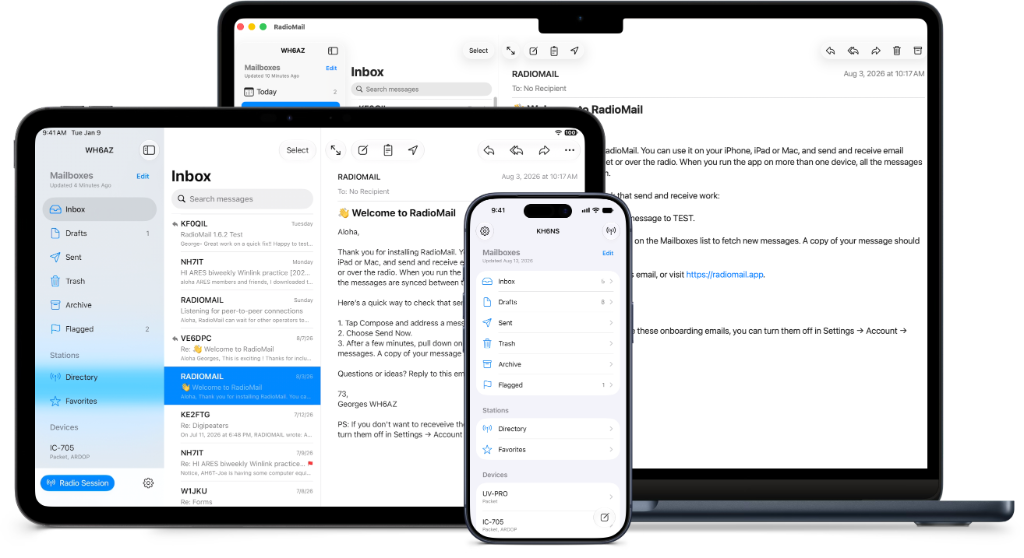
The goal remains the same: build the best Winlink app for portable operating on iPhone and iPad (and even Mac).
What’s new
- Automatic send and receive over Wi-Fi or cellular, with messages queued for your next radio session if you prefer
- Built-in Packet and ARDOP modems
- Native IC-705 radio support
- Simplified device management and switching
- Best Path propagation prediction to help select a station
- Incoming peer-to-peer connections over Packet and ARDOP
- Three-column interface for iPad
- Message sync across iPhone, iPad, and Mac
- Better mailbox management with search, smart mailboxes, and flags
- Improved Winlink Forms, including experimental form reflow for easier use on an iPhone in portrait orientation
RadioMail 2.0 is free to download and includes a 30-day trial, so you have time to explore the app, confirm that it works with your equipment, and decide if it’s right for you.
After the trial, a subscription or one-time purchase is required to continue sending and receiving messages. You’ll always retain access to the messages already stored in the app.
A note about the Mac
RadioMail 2.0 also runs on Apple Silicon Macs. It works well, but it’s still an iPad app, so expect a few Mac quirks. RadioMail is built for portable operation, and now that MacWinlink exists, I don’t plan to expand it to support shack equipment like USB devices or local modem software. If that’s what you need, MacWinlink is likely the better fit. If you operate portable from an iPhone or iPad and want your full mailbox on the Mac back in the shack, RadioMail fits that workflow.
What happens to RadioMail Classic?
The original RadioMail, now called RadioMail Classic, is no longer available for sale.
If you own it, you can keep using it and re-download it anytime from your App Store purchase history. Moving to 2.0 is optional.
Classic won’t get new features or regular bug fixes, and a future iOS update may eventually break it. Forms subscriptions will stop renewing at the end of the current period, and you’ll keep Forms in Classic permanently at no charge.
Just bought RadioMail? You’re covered
I know it stings to buy something right before a brand-new one replaces it. If you purchased the original RadioMail in 2026 or currently have an active Forms subscription, you get six months of RadioMail 2.0 free.
Keep RadioMail Classic installed on the same device when you first install RadioMail 2.0 so the new app can verify your eligibility and provide your offer code.
One favor
Because RadioMail 2.0 is a brand-new application, it starts over with no ratings or reviews on the App Store.
If you enjoy RadioMail, leaving a review is one of the best ways you can help other amateur radio operators discover it.
For bugs or technical problems, please use the RadioMail support forum instead of an App Store review. The forum makes it possible to ask questions, troubleshoot the problem, and get it fixed.
Huge thanks to everyone who tested RadioMail 2.0, flagged issues, and shared feedback. Now the fun part starts: building what comes next on this new foundation.
73,
Georges
PS: This release took longer than I planned. Right before launch, Hurricane Lowell hit Kauaʻi and left me without power, water, or internet for 12 days. Then App Store review took much longer than usual, likely from the iOS 27 launch rush. You can read my field notes on what I learned from the hurricane.